NotebookLM launches Cinematic Video Overviews, powered by a three-model AI pipeline
Written by Joseph Nordqvist/March 5, 2026 at 9:53 AM UTC
6 min readGoogle's AI research tool upgrades from narrated slides to source-grounded cinematic video using a three-model pipeline of Gemini 3, Nano Banana Pro, and Veo 3. Ultra-tier access is required, with a dedicated 20/day Cinematic limit.

What launched and when
Google's NotebookLM introduced Cinematic Video Overviews on March 4, 2026, completing its rollout to all Google AI Ultra subscribers in English the same day. The feature is the latest step in a deliberate build-out of NotebookLM's visual output stack: the tool launched podcast-style Audio Overviews in September 2024, added narrated-slide Video Overviews in July 2025, expanded into AI-generated infographics and slide decks powered by Nano Banana Pro in November 2025, rolled out ten customizable infographic style presets on March 2, and has now upgraded its video format to fully animated, source-grounded cinematic production.
Cinematic is a new format option within the existing Video Overviews tile in NotebookLM's Studio panel.
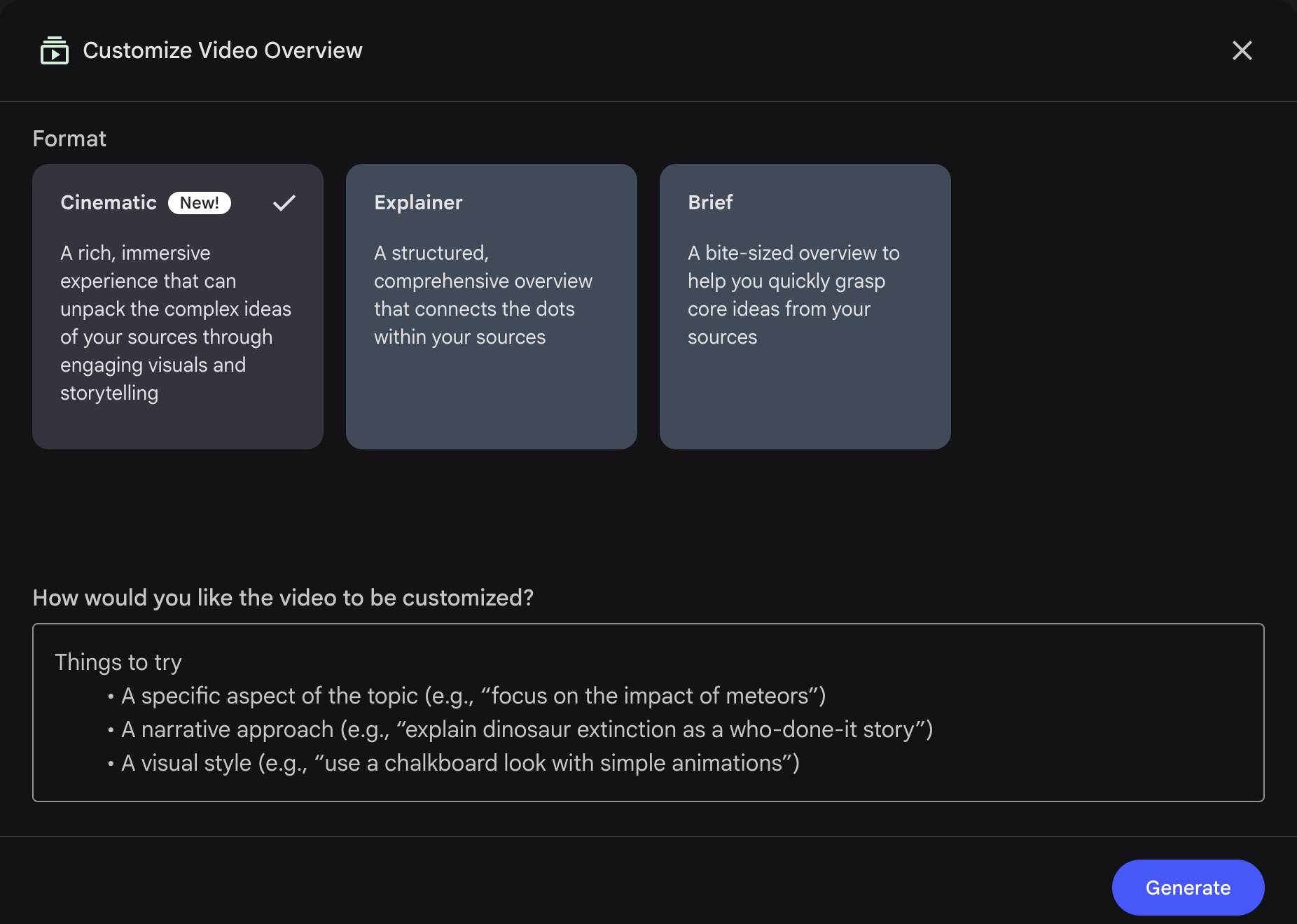
Users access it through the Customize Video Overview panel, where it appears alongside the existing Explainer and Brief formats, marked "New!" The UI describes it as "a rich, immersive experience that can unpack the complex ideas of your sources through engaging visuals and storytelling."
The shift is structural. Where Explainer and Brief formats work from pre-made templates, Cinematic builds its visual language from scratch for each source set.
The @NotebookLM X account used a Cinematic Video Overview to explain its own Cinematic Video Overview launch, calling it 'video-ception.'
The three-model AI pipeline
NotebookLM describes the underlying concept as 'agentic video': a system where the AI moves past filling in pre-made templates and instead takes on the role of an active creative director.
Standard narrated slides work adequately for a quick recap of familiar material, but a step-by-step mathematical proof requires different visual treatment than a French Revolution timeline.
Cinematic Video Overviews are designed to accommodate that difference.
The pipeline runs in four stages:
Stage 1: Narrative structure. Gemini analyzes the source material and determines the best overarching narrative structure, deciding whether the topic works better as a sharp tutorial or a deep-dive documentary. It also establishes a unified visual style for the video.
Stage 2: Specialized model routing. Gemini acts as a project manager, dividing visual elements and routing them to three specialized models depending on each scene's needs:
Gemini 3 Pro writes code to generate programmatic animations. This is specifically designed for tasks where standard image generation fails: precise geographic maps, abstract technical concepts, and data visualizations that need to remain structurally stable across frames.
Nano Banana Pro (Gemini 3 Pro Image) manages aesthetic control, ensuring visuals maintain a cohesive style across the video. Where Gemini 3 Pro handles precision, Nano Banana Pro handles consistency, so that elements share the same design language.
Veo 3 generates high-fidelity B-roll footage for narrative and emotional context; scenes where the script calls for atmosphere rather than hard data.
Stage 3: Self-critique loop. Once the footage is compiled, Gemini reviews the assembled video as its own editor, catching visual anomalies and adjusting for narrative flow. This automated self-correction stage is what turns a folder of independent media outputs into a continuous, polished story.
This pipeline represents a significant architectural choice: Google is vertically integrating its entire generative model family into a single consumer-facing output workflow, with Gemini coordinating specialized models rather than relying on a single general-purpose system for the full stack.
Notably, the Nano Banana Pro and Veo 3 capabilities described above reflect what Google has disclosed about those models generally. How they are specifically implemented or constrained within the NotebookLM pipeline has not been disclosed.
Multi-sensory features including dynamic music, sound effects, and multiple voice actors are in development but not yet available at launch.
What "cinematic" means in practice
The term requires some precision. Cinematic Video Overviews are not free-form text-to-video generation. Outputs remain strictly grounded in the sources uploaded to the notebook: PDFs, Google Docs, web links, YouTube transcripts, and similar materials.
The system analyzes those sources, builds a structured narrative around them, and generates animations to illustrate key ideas. Google has not published typical video lengths, though the self-promotional launch video posted by @NotebookLM ran 4 minutes and 48 seconds.
NotebookLM's own account provided sample steering prompts at launch: "Explain this topic to a 6 year-old," "Tell me the story of X. Do not use analogies or metaphors, just tell me the history in an engaging way," and requests for specific image types such as maps or graphs.
The source-grounding is a deliberate design constraint. Unlike general-purpose video AI tools, NotebookLM does not supplement outputs with external internet knowledge; outputs reference only what users have uploaded. This has meaningful implications for compliance-sensitive workflows and internal training content.
Access, pricing, and daily limits
Cinematic Video Overviews are currently available to Google AI Ultra subscribers, priced at $249.99 per month. There is no standalone NotebookLM Cinematic tier.
The Cinematic sub-limit, at 20 generations per day for Ultra (confirmed in Google's official support documentation) reflects the substantially higher generation cost of the pipeline.
Will Pro users have access to Cinematic? The @NotebookLM X account addressed this directly on launch day: "To our faithful Pro users, don't worry, we haven't forgotten about you. You've always been part of our roadmap. No promises on timing yet, but watch this space."
Leadership endorsement
Google DeepMind CEO Demis Hassabis endorsed the feature on X within hours of launch, quote retweeting NotebookLM's announcement with: "Still super underrated what the incredible @NotebookLM can do. It's magical - one of my favourite AI tools."
Competitive and strategic context
The differentiator of NotebookLM's new Cinematic video feature, compared to other AI video creation tools, is source-grounding and the research assistant context: Cinematic outputs are framed as comprehension tools, not marketing or entertainment content.
The free-text steering prompt deepens that differentiation further. Users can direct not just what the video covers but how it frames the material: a legal brief can be rendered as a plain-language explainer for a non-specialist audience, a scientific paper as a narrative told through the history of the problem rather than the methodology, or an internal policy document as a training walkthrough for a specific role.

Written by
Joseph Nordqvist
Joseph founded AI News Home in 2026. He studied marketing and later completed a postgraduate program in AI and machine learning (business applications) at UT Austin’s McCombs School of Business. He is now pursuing an MSc in Computer Science at the University of York.
View all articles →This article was written by the AI News Home editorial team with the assistance of AI-powered research and drafting tools. All analysis, conclusions, and editorial decisions were made by human editors. Read our Editorial Guidelines
References
- 1.
Generate your own Cinematic Video Overviews in NotebookLM. — Pete Aykroyd, Google, March 4, 2026
Primary - 2.
Was this useful?