Without voice, the ChatGPT macOS app falls short
Written by Joseph Nordqvist/February 3, 2026 at 10:28 PM UTC
3 min read
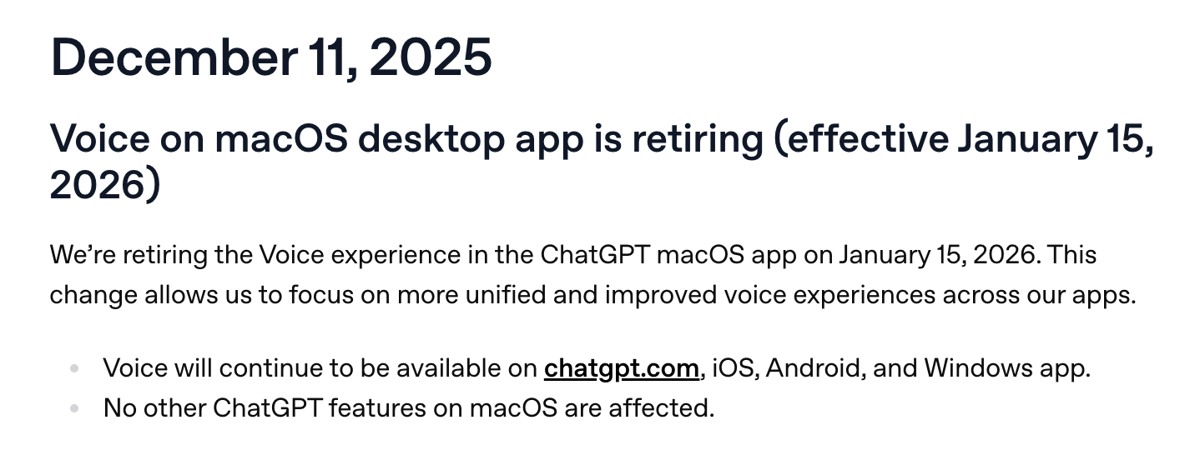
On January 15, 2026, OpenAI removed the Voice feature from the ChatGPT macOS desktop app.[1] While voice remains available on the web, mobile, and Windows, its absence on macOS has changed how the tool fits into daily academic and professional work.
For users like me who relied on voice as a low-friction companion while reading, the change introduced both workflow disruption and a sense that the desktop app is no longer complete.
Context and Background
Before its removal, the ChatGPT macOS app supported voice input and spoken responses. This allowed users to interact with the system without leaving their primary workspace.
For many people, including myself, a MacBook Pro is the daily driver for work and studying. It is where research papers are read, notes are written, and complex material is processed.
How I Used Voice
I did not use Voice to summarize papers or replace reading, but it functioned as a clarification tool.
While skimming research papers, I regularly encountered unfamiliar terminology or high-level concepts. Voice made it possible to ask brief questions aloud, such as how a term is generally used or what a concept refers to, without stopping to type or shift focus away from the paper or article.
That interaction preserved reading momentum and reduced unnecessary cognitive friction.
What Changed After January 15
With voice removed from the macOS app, that workflow no longer exists on the platform where most of my reading happens.
The alternatives require switching to a browser, another device, or using the iOS app (which still supports it).
No equivalent voice-based interaction was introduced inside the macOS app to replace what was removed.
While I can still use Voice, it does make the desktop app feel limited.
The App Now Feels Incomplete…
Before this change, the macOS app felt broadly comparable to the web experience. Feature differences existed, but they did not meaningfully limit core use cases.
That balance is now broken. Voice remains available on the web, but not in the native macOS app. As a result, the desktop application feels like a reduced version of the product rather than a full counterpart.
For a tool positioned as a primary interface for serious work, this distinction matters.
Platform Consistency and Expectations
OpenAI described the decision as a move toward more “unified and improved” voice experiences. From a macOS user perspective, the outcome feels less unified.
Windows retains voice. The web retains voice. macOS does not. That asymmetry weakens the desktop experience for macOS users and raises questions about the long-term role of the macOS app.
Outlook
OpenAI may reintroduce voice on macOS in a redesigned or system-level form. At present, there is no public indication of when or how that might happen.
Until then, the macOS app feels narrower in scope. It remains useful, but no longer complete in the way it was before January 15.

Editorial Transparency
This article was produced with the assistance of AI tools as part of our editorial workflow. All analysis, conclusions, and editorial decisions were made by human editors. Read our Editorial Guidelines
References
- 1.
Was this useful?